Common Programmable Sewing Machine Issues: Control Circuit, Sensors, Servo Motor
14/08/2026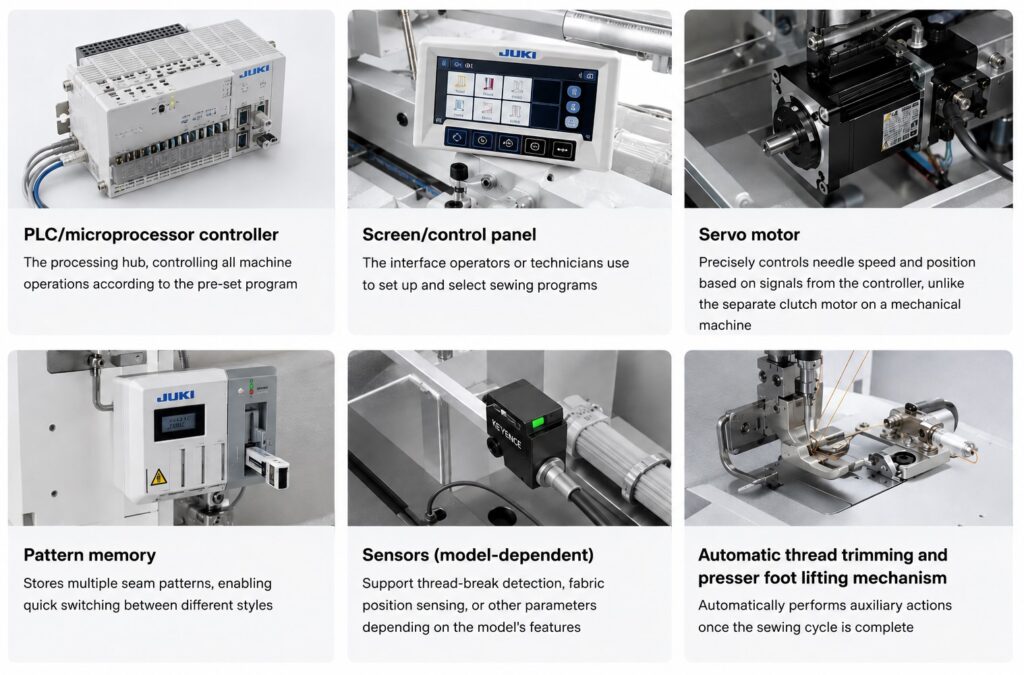
Unlike a mechanical sewing machine, which only experiences purely mechanical faults, a programmable sewing machine has an additional category of issues related to its electronic systems — the PLC control circuit, sensors, and servo motor. Correctly identifying this category of issues helps factories resolve problems quickly and avoid mistakenly calling in a general mechanical technician for faults that require electronics expertise.
📖 For general mechanical errors (thread breaking, skipped stitches, puckering…) that apply to all types of industrial sewing machines, see: “5 Common Industrial Sewing Machine Errors and How to Fix Them”
1. Control Circuit Errors (PLC/Microprocessor)
Symptom: The machine fails to start, the control screen freezes/hangs, or the machine responds slowly or not at all when setting parameters.
Common causes:
- Unstable power supply, causing temporary faults in the control board.
- Fabric dust and moisture accumulating over time, affecting electrical contact points on the board.
- Hardware failure in the control board after extended use.
How to fix it:
- Check whether the incoming power supply is stable; consider installing a voltage stabilizer if the factory’s power supply fluctuates frequently.
- Clean the control board area regularly, preventing fabric dust buildup (this should be performed by a technician with electronics expertise).
- If the machine won’t restart after checking the power supply, contact a qualified technician to inspect and replace the control board if needed.
2. Sensor Errors (False Alarms or Failure to Detect)
Symptom: The machine signals a thread-break error even though the thread is intact, or conversely, fails to detect an actual thread break.
Common causes:
- Sensor accumulated with fabric dust or thread lint, reducing sensitivity.
- Sensor position shifted over time due to operational vibration.
- Sensor component failure after extended use.
How to fix it:
- Clean the sensor area regularly according to the maintenance schedule.
- Check and re-align the sensor position per the manufacturer’s specifications.
- If cleaning and re-alignment don’t resolve the issue, the sensor needs replacement — contact a qualified technician to ensure the correct compatible sensor type is installed.
3. Servo Motor Errors (Loss of Sync, Incorrect Response to Commands)
Symptom: The motor doesn’t run at the set speed, stops the needle at the wrong position, or produces unusual noise during operation.
Common causes:
- Loss of synchronization between the control signal from the board and the motor’s actual response.
- Motor overload from continuous high-intensity operation over an extended period.
- Loose or damaged connection cable between the control board and the motor.
How to fix it:
- Check the connection points between the control board and the motor, ensuring a secure connection.
- Let the machine rest and cool down if motor overload from prolonged continuous operation is suspected.
- If the issue persists, a qualified technician needs to inspect and recalibrate the synchronization between the board and motor, or replace the motor if it’s damaged.
4. Lost or Corrupted Saved Programs (Pattern Memory)
Symptom: A previously saved seam program is lost, or when reselecting the program, the machine sews incorrectly compared to the original setup.
Common causes:
- Sudden power loss while loading a design file (PLT/DXF) or while the machine is saving a program to internal memory for later reuse.
- Storage memory failure after extended use.
- A new file loaded overwriting the exact save location of an existing program without a prior backup.
How to fix it:
- Always keep the original design files (PLT/DXF) backed up on a computer/design-team storage system, not relying solely on the machine’s internal memory.
- Avoid switching off the machine abruptly while loading a file or while the machine is saving a program to memory.
- Use clear file names/save locations, avoiding overwriting an existing program still in use.
- If memory failures occur repeatedly, a technician needs to inspect the storage hardware, which may require replacement.
5. Connection/Communication Errors Between Electronic Modules
Symptom: The machine’s components (screen, control board, motor, sensors) fall out of sync; the machine operates intermittently even though individual components test fine when checked separately.
Common causes:
- Loose, damaged, or oxidized connection cables between modules.
- Electromagnetic interference from other equipment in the factory affecting signal transmission between modules.
How to fix it:
- Inspect all connection cables, ensuring none are loose or damaged.
- Reposition the machine if electromagnetic interference from nearby equipment is suspected.
- If the cause can’t be identified, a qualified technician needs to inspect the entire connection system.
6. PLT/DXF Design File Loading Errors
📌 This is a category of errors specific to the software design → export → load workflow (see the full process in: “Seam Design & PLT/DXF Export Workflow: A Step-by-Step Guide for Programmable Sewing Machines”), distinct from the purely hardware-related faults covered above.
Symptom: The machine can’t read a newly loaded file, shows a format error, or executes a seam/cutting path that doesn’t match the original design in the software.
Common causes:
- The exported file isn’t in the format the machine supports (e.g., the machine only reads PLT, but the file was exported as DXF, or vice versa).
- The file was corrupted during transfer via USB, LAN, or memory card.
- The design software’s export version isn’t compatible with the machine’s controller version.
- The unit of measurement (mm/inch) or scale in the design file doesn’t match the machine’s default settings, causing the seam/cutting to come out the wrong size.
How to fix it:
- Verify the file format before loading, ensuring it matches what the machine supports (PLT or DXF).
- Try reloading the file via a different transfer method (e.g., switching from LAN to USB) if file corruption during transfer is suspected.
- Confirm with the design team which export version is compatible with the machine model in use.
- Check the unit of measurement and scale in the design file before exporting, particularly when the design was done by an outside party or on a different CAD system than the factory’s own.
Frequently Asked Questions
Some basic issues (cleaning sensors, checking cable connections) can be handled by operators after proper training. However, issues directly related to the control board, servo motor, or storage memory should be handled by a technician with electronics expertise, to avoid further damaging other components.
Keep the original design files (PLT/DXF) backed up on your computer/design-team storage system, not relying solely on the machine’s internal memory; avoid switching off the machine abruptly while loading/saving a file; and install a voltage stabilizer if your factory’s power supply is unstable.
Yes. Beyond the standard mechanical maintenance checklist (cleaning, lubrication, needle inspection), a programmable sewing machine requires additional periodic maintenance for its electronic systems (cleaning the control board, checking sensors, inspecting cable connections) — refer to the supplier’s specific documentation.
First check whether the file is in the format the machine supports (some machines only read PLT, others only DXF), then try reloading it via a different transfer method if file corruption during transfer is suspected. If the error persists, confirm with the design team which export version is compatible with the machine.
Contact us in Southeast Asia - South Asia:
- Singapore: 7 Temasek Boulevard, #43-01A Suntec Tower One, Singapore 038987.
- Vietnam - Philippines - Thailand - Cambodia: Unit 1, 3rd Floor, Building H, Street 17, Tan Thuan Export & Processing Zone, Tan Thuan Ward, HCMC, Vietnam.
- India: Sy. No. 23/8, Ground Floor, Masthappa Layout, Near Yashas Vidya Kendra School, Somashettyhalli, Chikkabanavara Post, Bangalore - 560090 , Karnataka, India.
- Bangladesh: Mizan House, 6th Floor, Flat 6/A, House 6, Road 2, Lane 1, Block G, Halishahar H/E, Chattogram, Bangladesh.
- Phone: (+84) 0983 309 910 (WhatsApp, WeChat, Zalo)
- Email: marketing@hoshima-int.com
- LinkedIn | Facebook | YouTube: Hoshima International